
Enhancing Education: Why the Galaxy Tab S7 FE is a Perfect ExtraCurricular Companion
Last Update: Wednesday, September 29, 2021 : 15:49 (+4GMT)
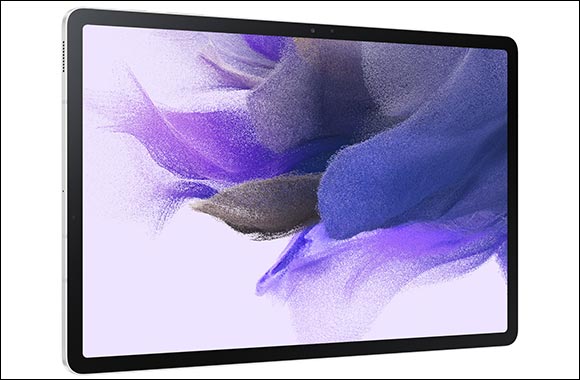
September 29, 2021: It’s that time of year again. September has arrived and for countless students, a new school or university term is underway. Like always when academic calendars resume following the summer break, everyone is eager to start strongly, learn more, produce higher work standards, and position themselves to flourish across all areas of study. And this time around, such efforts have been given a timely boost because one of Samsung’s newest innovations is the ultimate device for driving educational productivity – the Galaxy Tab S7 FE.
Many classroom environments now welcome the use of tablets for educational purposes. Learning and working today also goes way beyond the premises of schools and higher education institutions. In today’s digital-first world, there are many online portals where people can study, learn, and work, as well as many digital-focused coursework or extracurricular activities. Furthermore, there are groundbreaking smart devices to support such endeavors – and this is where the Galaxy Tab S7 FE comes in.
The perfect companion for educational purposes, the Galaxy Tab S7 FE is nothing short of multitasking and productivity powerhouse. The device offers empowerment, versatility, and flexibility through a host of valuable features and capabilities, enabling every user to complete more tasks more efficiently and effectively than ever. Here, we explain why this is possible with the Galaxy Tab S7 FE and what makes the device a learning companion like no other.
Greater efficiency with Samsung mainstays
For every student completing coursework and undertaking extracurricular tasks, you can count on your Galaxy Tab S7 FE to stay productive thanks to complimentary S Pen – which is among Samsung’s most intuitive essential accessories. Included in the box, you can make the most of the tablet’s 12.4-inch display – a gateway to greater performance in itself – and power through your tasks with even greater efficiency, organization, and creativity. What’s more, you can easily convert your on-screen handwritten notes to text with Samsung Notes, organize content with automatic tags, and use Intelligent Search to find the exact note you need in an instant — no matter if it’s typed or handwritten. And for avid note-takers, Noteshelf enables you and your S Pen to create detailed, colorful notes that accurately capture your thoughts and convey your creativity.
Multitask with even more empowerment
Does your work require switching between apps regularly? If so, does this slow down your creativity and performance? Well, with the Galaxy Tab S7 FE, there’s no need to worry anymore because the device support multitasking efforts with ease. Should a research paper or work project require you to open multiple tabs or applications at once, you can open and use as many as three at once thanks to Multi-Active Window. Browse the web, take notes, and watch learning materials all on one screen to bring the full potential of your work-related projects to life. Furthermore, App Pair also supports these efforts because you can save and quickly launch your favorite combination of apps together in Multi-Active Window.
Work with laptop-like capabilities
Looking for even more ways to maximize your productivity for educational and extracurricular purposes? Again, the Galaxy Tab S7 FE has you covered. With Samsung DeX and a Book Cover Keyboard, you can use your tablet just like a laptop, which effectively transforms the UI to a PC-like experience while you power through your to-do list. At the same time, you can transform your Galaxy Tab S7 FE into an additional display alongside your PC thanks to Second screen. The feature expands your view, ensures greater visibility across all areas of study, and ultimately allows you to get even more work finished to the best of your ability.




- From a Pair of Shoes to a New Dubai Property: British Expat Wins Through ‘Win ... [3006-Views]
- UAQ Free Zone and Port City Colombo Sign Agreement to Promote Investment ... [1973-Views]
- Sheikh Zayed Falcon Release Programme releases 2,400+ falcons in the wild sinc... [1823-Views]
- DSS FINAL SALE BRINGS UP TO 90% OFF ACROSS MORE THAN 500 BRANDS FOR THE FINAL ... [1552-Views]
- President of the Comoros H.E. Azali Assoumani inaugurates UAE-financed solar p... [1515-Views]
- Environment Agency - Abu Dhabi partners with Japan’s Suwa Falconry Preservatio... [1513-Views]
- e& UAE launches Business Pro AI bundled with Microsoft Copilot at no additiona... [1412-Views]
- Held under the patronage of His Highness Sheikh Hamdan bin Zayed Al Nahyan Ab... [1186-Views]
- Beautyworld Dubai's 30th Edition Brings Global BeautyIcons Together This Octob... [1182-Views]
- Tadej Pogacar Chases Tour de France–Vuelta a Espana Double... [1143-Views]
- In a first-of-its-kind experience for a private Emirati company Hattlan Media... [1108-Views]
- "A Dubai Invite" programme concludes following more than 90,000 applications f... [1087-Views]
- Al Habtoor Motors launches ‘Back to School with Mitsubishi’ offers with Buy No... [1036-Views]
- Stellar Wine Cellar: Emirates to serve exceptional Champagnes and fine wines o... [1015-Views]
- Salik Renews Strategic Partnership for Five Years to Support Tolling System an... [973-Views]
- LG Empowers Designers and Videographers with New Ultrafine Evo 6K Monitor... [966-Views]
- President of Senegal Receives HE Al Zeyoudi in Dakar to Discuss Expanding Trad... [900-Views]
- ‘Win Your Home in Dubai’ Concludes Landmark Citywide Initiative, Driving More ... [861-Views]
- Abu Dhabi Student’s AI Triage Platform That Guides Patients to Right Care Wins... [849-Views]
- Isaac del Toro lands overall title at the Lidl Deutschland Tour... [809-Views]
