
How Multi-Screen Collaboration and Multi-Window Help you Work Faster and Smarter with the EMUI 11 Software Update on the HUAWEI MatePad Pro
Last Update: Sunday, February 28, 2021 : 14:18 (+4GMT)
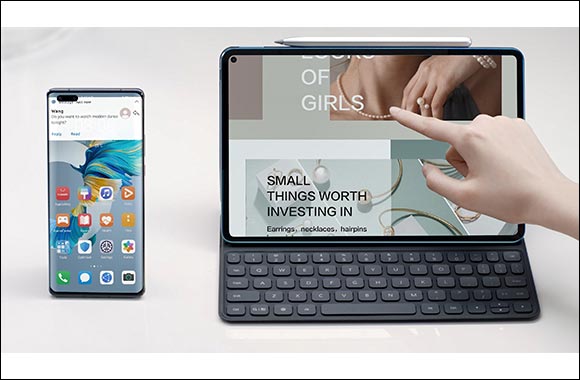
United Arab Emirates - February 28, 2021: Nowadays many of us have multiple devices that we use simultaneously. The main device is obviously our smartphones as we use that more than the rest. Then there is the laptop, which we use more for getting work done, however, between the smaller screen smartphone and larger display of the laptop comes the tablet – a device with a bit of both worlds. At present, Huawei smartphones, laptops and tablets all support some degree of interoperability, but Huawei is stepping things up with the new EMUI 11 software update on the HUAWEI MatePad Pro. The new EMUI 11 enhances Multi-screen Collaboration and Multi-Window features on the HUAWEI MatePad Pro for a seamless and smarter cross-device experience and faster ways of getting work done.
EMUI 11 with Multi-Screen Collaboration on the HUAWEI MatePad Pro
Check if you have the latest EMUI 11 installed
. To install the latest update, follow the steps below:
- Go to settings on your HUAWEI MatePad Pro
- Click on Systems & Updates
- Open Software Update
- Tap on Check for Updates
- If the Update is available, click on Download and Install
- The HUAWEI MatePad Pro will automatically Reboot after Installation is complete
Multi-Screen Collaboration: A smart office right at your fingertips
What is Multi-Screen Collaboration? Huawei Share Multi-screen Collaboration serves as an ultimate platform for allowing two devices such as smartphones and tablets to be operated simultaneously for all sorts of data sharing. However, Multi-Screen Collaboration on EMUI 11offers better convenience with its enhanced tablet-smartphone collaboration features. After successfully connecting your smartphone with the HUAWEI MatePad Pro, an app can be shown in full screen in the Multi-Screen Collaboration window. You can read news and messages with a full screen while making full use of the tablet keyboard to draft emails and reply to messages.
Another improved feature on the Multi-Screen Collaboration feature is the ability to launch and show a smartphone app on a tablet and display another app on the smartphone. We no longer have to download the same apps across multiple devices, or login to our accounts every time we switch devices. Moreover, if you are presenting at work with your tablet, you can rest assured that privacy data such as messages and incoming calls will only be displayed on your smartphone without any interruption on the tablet.
EMUI 11 running on HUAWEI MatePad Pro
New Multi-window: Multitasking taken to the next level
Multi-Window serves to eradicate the tiresome app-switching process. To illustrate this, you can literally chat with friends while you are shopping online. You can also edit documents without having to exit an email interface, and oh! Not to mention, replying to instant messages when you are watching your favourite comedy sitcom!
On top of the Multi-Window feature, the HUAWEI MatePad Pro running on EMUI 11 allows you to add two floating windows. Whether you are playing games or watching videos, you can promptly reply to messages using the floating windows with no need to exit what you are doing. This is very helpful for office work as well, such as reading and editing files. You can stay concentrated on a current task, while efficiently and quickly handling other tasks via floating windows, be it for replying to messages, doing calculations with a calculator or searching for an attachment online.
With EMUI 11, software update on the HUAWEI MatePad Pro the possibilities for getting work done smarter and faster have been multiplied. Make sure you update your HUAWEI MatePad Pro to make use of its improvements and enhancements and to become productive in an efficient way.
Previous Article
Here is Why the HUAWEI FreeLace Pro is our Favourite for One of t...
Next Article
Samsung Announces Trade-in Initiative for Consumers Purchasing th...
Related Articles More Information Technology ›






Most Viewed – Last 30 Days
- From a Pair of Shoes to a New Dubai Property: British Expat Wins Through ‘Win ... [2950-Views]
- Five ways Emirates is helping customers travel with greater confidence... [2222-Views]
- UAQ Free Zone and Port City Colombo Sign Agreement to Promote Investment ... [1865-Views]
- Sheikh Zayed Falcon Release Programme releases 2,400+ falcons in the wild sinc... [1768-Views]
- DSS FINAL SALE BRINGS UP TO 90% OFF ACROSS MORE THAN 500 BRANDS FOR THE FINAL ... [1474-Views]
- e& UAE launches Business Pro AI bundled with Microsoft Copilot at no additiona... [1363-Views]
- Environment Agency - Abu Dhabi partners with Japan’s Suwa Falconry Preservatio... [1356-Views]
- President of the Comoros H.E. Azali Assoumani inaugurates UAE-financed solar p... [1299-Views]
- e& UAE leads industry transition to 5G-native IoT with successful testing of R... [1225-Views]
- How to Choose the Right Medical Insurance in Dubai Based On Your Lifestyle?... [1182-Views]
- Held under the patronage of His Highness Sheikh Hamdan bin Zayed Al Nahyan Ab... [1132-Views]
- Beautyworld Dubai's 30th Edition Brings Global BeautyIcons Together This Octob... [1121-Views]
- Tadej Pogacar Chases Tour de France–Vuelta a Espana Double... [1074-Views]
- To enhance quality of sports services Ministry of Sports organises the first ... [984-Views]
- "A Dubai Invite" programme concludes following more than 90,000 applications f... [977-Views]
- Stellar Wine Cellar: Emirates to serve exceptional Champagnes and fine wines o... [958-Views]
- LG EMPOWERS DESIGNERS AND VIDEOGRAPHERS WITH NEW ULTRAFINE EVO 6K MONITOR... [912-Views]
- Al Habtoor Motors launches ‘Back to School with Mitsubishi’ offers with Buy No... [896-Views]
- In a first-of-its-kind experience for a private Emirati company Hattlan Media... [891-Views]
- ORA Land Launches BluBay with Suryakumar Yadav as Brand Ambassador, Reinforcin... [804-Views]
