
Google's top tips for keeping you and your family safer online
Last Update: Wednesday, February 6, 2019 : 18:04 (+4GMT)
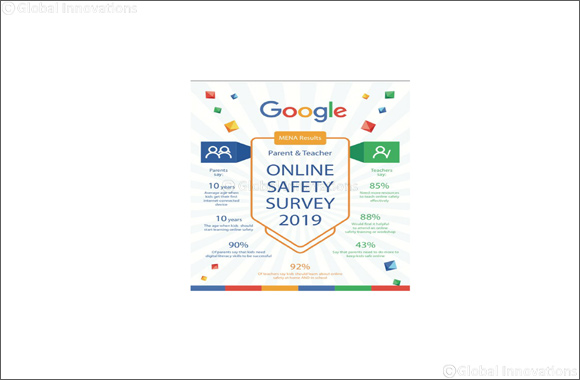
February 6, 2019 Dubai, United Arab Emirates: At Google, we build protection into everything we make, so our users can be confident that their personal information is secure. According to a recent survey we conducted in MENA for parents and teachers, we found that parents believe that children should learn about online safety and digital citizenship at 10 years old. The research also shows that 43% of teachers say that parents need to do more to keep kids safe online. Additionally, 85% of teachers feel that they need more resources to teach online safety to your students.
However, there are still some best practices that you and your family can follow to help ensure they are safer not only while on Google but also while navigating the wider Internet. This Safer Internet Day, take a moment to strengthen your online security by completing these quick tips and help guide the younger users in your life to do the same. Learn more about our tips at safety.google/security/security-tips/
Keep your software up-to-date:
To help protect your online activity, always run the latest version of software across the web browsers, operating systems, and applications on all your devices. Some services, including the Chrome browser, will automatically update themselves. Other services may notify you when it’s time to update.
Use unique passwords for your accounts:
Using the same password to log in to multiple accounts increases your security risk. It’s like using the same key to lock your home, car and office – if someone gains access to one, all of them could be compromised. Create a unique password for each account to eliminate this risk and keep your accounts more secure. Along with creating unique passwords, make sure that each password is hard to guess and better yet, at least eight characters long.
Consider using a password manager, like the one built into your Chrome browser, to help you create, safeguard and keep track of all the passwords for your online accounts.
Take the Google Security Checkup:
The Security Checkup gives you personalized and actionable security recommendations that help you strengthen the security of your Google Account.
Taking the Security Checkup doesn’t just help you stay safer while using Google. The Checkup also includes helpful tips to keep you safer across the web, such as by reminding you to add a screen lock to your mobile phone, reviewing third-party access to your Google Account data, and showing you what sites and apps you may have signed in to using your Google Account.
Go to g.co/securitycheckup to take your Security Checkup.
Set up a recovery phone number or email address and keep it updated:
Adding recovery information—such as a phone number or back up email address—to your account can help you more quickly get back into your account if you ever lose access or can't sign in. Remember to update the information if you change phone number or email address.
For many web services, a recovery phone number or email address can be used to notify you if there's suspicious activity in your account, or can help to block someone from using your account without permission.
For example, if an unknown device is used to sign in to your Google Account, you may be required to verify that the sign in is legitimate by entering a code that gets sent to your recovery phone number. To set up recovery information on your Google Account, visit security.google.com and click “Your personal info.”
Go a step further by setting up 2-Step Verification:
Go one step further to secure your accounts by setting up 2-Step Verification, which requires you to use a second step—like entering a 6-digit code generated by the Google Authenticator app—in addition to your username and password to sign in to your account.
Setting up 2-Step Verification will significantly decrease the chance of someone gaining unauthorized access to your account. Once you set up 2-Step Verification for an account, remember to be ready for the second verification step each time you sign in.
To set up 2-Step Verification on your Google Account, visit security.google.com and click “2-Step Verification.”
If you have children, talk to them about online safety early, and set digital ground rules for your households:
Just like we teach our kids how to drive before handing our kids the keys to the car, it’s helpful to teach younger kids the basics of online safety and citizenship before handing them a device. A great way to get started is to review the ‘Abtal Al Internet’ guide together. You can teach them about being kind online, how to make strong passwords, what is appropriate to share online with whom, how to spot online scams, and when it’s time to consult a trusted adult. They can also reinforce all of these topics by playing the ‘Aalam Al Internet’ online.






- From a Pair of Shoes to a New Dubai Property: British Expat Wins Through ‘Win ... [3006-Views]
- UAQ Free Zone and Port City Colombo Sign Agreement to Promote Investment ... [1973-Views]
- Sheikh Zayed Falcon Release Programme releases 2,400+ falcons in the wild sinc... [1823-Views]
- DSS FINAL SALE BRINGS UP TO 90% OFF ACROSS MORE THAN 500 BRANDS FOR THE FINAL ... [1552-Views]
- President of the Comoros H.E. Azali Assoumani inaugurates UAE-financed solar p... [1515-Views]
- Environment Agency - Abu Dhabi partners with Japan’s Suwa Falconry Preservatio... [1513-Views]
- e& UAE launches Business Pro AI bundled with Microsoft Copilot at no additiona... [1412-Views]
- Held under the patronage of His Highness Sheikh Hamdan bin Zayed Al Nahyan Ab... [1186-Views]
- Beautyworld Dubai's 30th Edition Brings Global BeautyIcons Together This Octob... [1181-Views]
- Tadej Pogacar Chases Tour de France–Vuelta a Espana Double... [1143-Views]
- In a first-of-its-kind experience for a private Emirati company Hattlan Media... [1108-Views]
- "A Dubai Invite" programme concludes following more than 90,000 applications f... [1086-Views]
- Al Habtoor Motors launches ‘Back to School with Mitsubishi’ offers with Buy No... [1036-Views]
- Stellar Wine Cellar: Emirates to serve exceptional Champagnes and fine wines o... [1015-Views]
- Salik Renews Strategic Partnership for Five Years to Support Tolling System an... [973-Views]
- LG Empowers Designers and Videographers with New Ultrafine Evo 6K Monitor... [966-Views]
- President of Senegal Receives HE Al Zeyoudi in Dakar to Discuss Expanding Trad... [898-Views]
- ‘Win Your Home in Dubai’ Concludes Landmark Citywide Initiative, Driving More ... [860-Views]
- Abu Dhabi Student’s AI Triage Platform That Guides Patients to Right Care Wins... [846-Views]
- Isaac del Toro lands overall title at the Lidl Deutschland Tour... [808-Views]
